Using DanNet with AI tools
DanNet can be connected directly to AI assistants like Claude, ChatGPT, and other tools that support the Model Context Protocol (MCP). This allows you to query Danish word meanings, semantic relations, and linguistic data through natural conversation.
Note: The MCP standard is still evolving, and not all AI tools support it yet.
What is MCP?
The Model Context Protocol is an open standard that allows AI assistants to connect to external data sources. Think of it as a plugin system for AI tools. When DanNet is connected via MCP, the AI can look up information directly in our database rather than relying solely on its training data.
Connecting DanNet to your AI tool
To connect DanNet, you need to add it as a "connector" or "MCP server" in your AI tool's settings. The details vary by tool, but you will typically need:
- MCP server URL:
https://wordnet.dk/mcp - Name: DanNet (or any name you prefer)
Example: Claude Desktop
In Claude Desktop, go to Settings > Connectors > Browse Connectors and click "add a custom one". Enter "DanNet" as the name and https://wordnet.dk/mcp as the server URL.
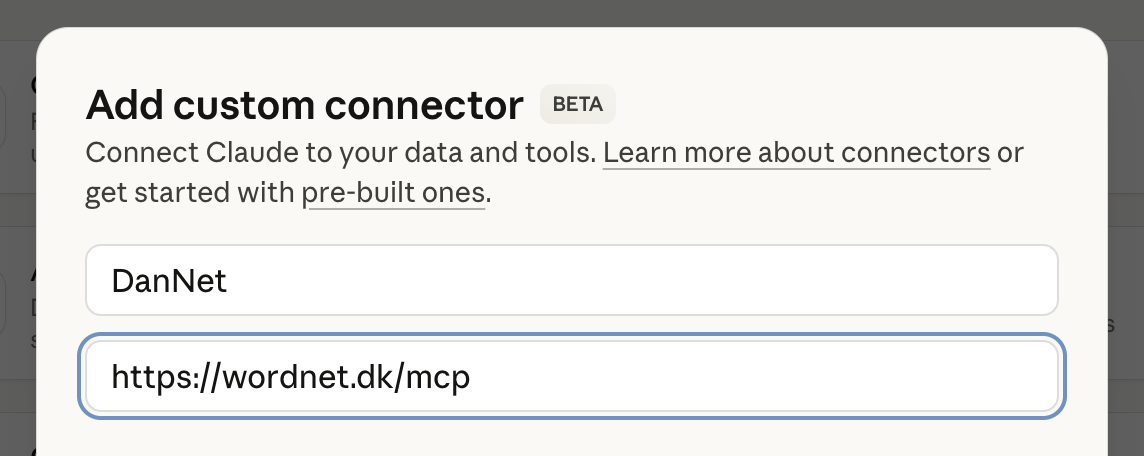
Example: Claude.ai
On claude.ai, go to Settings > Connectors and click "Add connector". Enter "DanNet" as the name and https://wordnet.dk/mcp as the server URL.
What can you ask?
Once connected, you can ask your AI assistant questions like:
- "What are some synonyms for 'glad' in Danish?"
- "How is 'hund' (dog) related to other animal concepts in DanNet?"
- "What words are hyponyms of 'møbel' (furniture)?"
The AI will query DanNet directly and give you answers based on our lexical database.
Technical details
DanNet is registered in the MCP server registry as io.github.kuhumcst/dannet. For developers interested in the implementation, see the MCP server source code on Github.