SPARQL guide
This is a hands-on introduction for people with no prior knowledge of RDF or SPARQL. By reading this guide you will learn how to use SPARQL queries to fetch data from the DanNet database.
- What is RDF?
- What is SPARQL?
- Exploring relationships
- OPTIONAL: handling missing data
- FILTER: narrowing results
- Aggregation: counting, grouping, and limiting
- DanNet-specific relations
- Practical tips
- Appendix A: The SPARQL editor
- Appendix B: Quick overview
What is RDF?
RDF (Resource Description Framework) is a way of representing knowledge as one or more interlinked graphs. The DanNet database models such graphs. Where relational databases (e.g. using SQL) store data in rows and columns, RDF databases stores data as triples, i.e. statements of the form:
subject predicate object .
Each triple is a single fact. A subject is connected to an object via a predicate (also called a property). That's it. Every piece of information in the database is expressed this way. For this reason, an RDF database is also commonly called a triplestore.
NOTE: if you want to know why DanNet stores its data as triples, you can check out the original rationale.
An example: the definition of "kage" (cake)
Here's a real triple from DanNet, written in the Turtle syntax (the most common human-readable RDF format):
dn:synset-52

skos:definition

"sødt bagværk der især serveres til kaffe el. te el…"@da

.
Or with a little less whitespace:
dn:synset-52 skos:definition "sødt bagværk der især serveres til kaffe el. te el…"@da .
This code reads:
the synset
synset-52has the definition "sødt bagværk der især serveres til kaffe el. te el…" in Danish.
A few things to notice:
dn:synset-52is a URI, a globally unique identifier for this concept. Thedn:part is a prefix, short forhttps://wordnet.dk/dannet/data/. So the full URI ishttps://wordnet.dk/dannet/data/synset-52. You can actually visit that page in your browser and see everything about it.skos:definitionis also a URI (from the SKOS vocabulary). It's the predicate."…"@dais a literal, i.e. a plain text value. The@datag marks it as Danish.- The triple ends with a period.
An RDF dataset is just a huge collection of these triples. DanNet contains around ~70K Danish synsets covering ~62K words, all described as triples. The DanNet data model section below explains how these triples are organised.
Turtle shorthand
Turtle lets you abbreviate. When multiple triples share the same subject, you can use a semicolon to continue with the next predicate:
dn:synset-52 rdf:type ontolex:LexicalConcept ;
             rdfs:label "{kage_1§1}"@da ;
             skos:definition "sødt bagværk der især serveres til kaffe el. te el…"@da ;
             wn:hypernym dn:synset-135 .
This describes four facts about the same subject. You can see this exact Turtle output on any DanNet RDF resource page. For instance, download the Turtle file for synset-52. You will also see this shorthand in SPARQL queries, where the same semicolon syntax is used inside WHERE blocks.
The DanNet data model (simplified)
DanNet follows the OntoLex-Lemon standard. The key building blocks are:
- Words (LexicalEntry), e.g. "kage", with a written form and part of speech.
- Senses (LexicalSense), a pairing of a word with a specific meaning.
- Synsets (LexicalConcept), a meaning shared by one or more words, with a definition and relations to other synsets (hypernyms, hyponyms, etc.).
The chain looks like this:
LexicalEntry (word)  →  LexicalSense  →  LexicalConcept (synset)
                                                ↕
                                other Synsets (hypernyms, hyponyms, etc.)
NOTE: while the formal OntoLex-Lemon terms (LexicalEntry, LexicalSense, LexicalConcept) appear in SPARQL queries, we will simply refer to these as words, senses, and synsets throughout this guide.
What is SPARQL?
SPARQL is the query language for RDF data. If SQL is how you query tables, SPARQL is how you query graphs of triples. It's not just a DanNet thing either: SPARQL is used across the linked data world. Most famously, Wikidata exposes its entire knowledge base (over 100 million items) through a SPARQL endpoint. The same query concepts you learn here apply directly there. In fact, the SPARQL Wikibook uses Wikidata as its running example and is a great companion to this tutorial.
The key insight: a SPARQL query is a pattern of triples with variables in it. The database finds all triples that match your pattern and returns the variable bindings. If you haven't read the RDF section yet, now is a good time.
NOTE: all examples in the guide run against the DanNet SPARQL endpoint. Keep in mind that this public version of DanNet has limits in place for both the size of the result sets and the query run time. We also limit the number of concurrent requests that require inferencing to complete.
Your first query
Let's find all the meanings (synsets) of the Danish word "kage":
SELECT DISTINCT  ?synset ?label ?definition
WHERE
  { ?entry ontolex:canonicalForm/ontolex:writtenRep "kage"@da .
    ?entry ontolex:sense/ontolex:isLexicalizedSenseOf ?synset .
    ?synset  rdfs:label       ?label ;
             skos:definition  ?definition
  }
Let's break this down:
SELECT DISTINCT ?synset ?label ?definitiontells the database which variables to return (DISTINCTremoves duplicate rows).WHERE { … }contains the graph pattern to match.?entry,?synset,?label,?definitionare variables (always start with?)."kage"@dais a concrete value: the Danish string "kage".- Each line inside the
WHEREblock is a triple pattern, ending with a period.
The query reads:
Find any entry whose written form is 'kage', follow its senses to their synsets, and return each synset's label and definition.
Notice the slash syntax in ontolex:canonicalForm/ontolex:writtenRep? This is so-called a property path, explained below.
This particular query returns 3 rows of results:
| ?synset | ?label | ?definition |
|---|---|---|
| dn:synset-52 | {kage_1§1} | sødt bagværk der især serveres til kaffe el. te… |
| dn:synset-21205 | {kage_1§2} | mere el. mindre fast (størknet el. sammenpresset) … |
| dn:synset-40950 | {en del/bid af kagen_1§6} | en andel af noget fordelagtigt, især et økonomisk … |
The word "kage" has three meanings: cake (the pastry), a compacted mass or lump, and the idiomatic "en del af kagen" (a piece of the pie, i.e. a share of something desirable).
Reading the synset labels
The labels like {kage_1§1} deserve explanation. They list all the words that share this meaning, i.e. the synonyms. When a synset has several, you'll see them separated by semicolons: {bag_2§1; bagværk_§1; brød_1§1b}. The §1 notation comes from Den Danske Ordbog (DDO) and points to a specific definition number in that dictionary.
Property paths
Notice the slash syntax:
?entry ontolex:canonicalForm/ontolex:writtenRep "kage"@da .
This is a property path. It's shorthand for two triple patterns chained together:
?entry ontolex:canonicalForm ?form .
?form  ontolex:writtenRep    "kage"@da .
The / means "follow this property, then follow that property". It saves you from having to introduce intermediate variables you don't care about.
Exploring relationships
Ontological types and RDF Bags
Every synset in DanNet is annotated with one or more ontological types from the dnc: namespace (e.g. dnc:Animal, dnc:Container, dnc:Comestible). These types are stored in an RDF Bag, a container that holds an unordered collection of values. To access the values inside a Bag, you use rdfs:member (which matches any member of the Bag) in a property path:
SELECT  ?synset ?definition
WHERE
  { ?synset dns:ontologicalType/rdfs:member dnc:Animal .
    ?synset   skos:definition   ?definition ;
              dns:sentiment     ?opinion .
    ?opinion  marl:hasPolarity  marl:Negative
  }
This query finds animal concepts that have a negative sentiment annotation. It combines several things: navigating into an RDF Bag via dns:ontologicalType/rdfs:member, matching a specific ontological type (dnc:Animal), and traversing the sentiment data which uses the MARL vocabulary. This is the kind of cross-cutting query that would be very hard to answer by browsing the web interface.
NOTE: the "Run this query" link above has label enrichment enabled. With this enabled, the editor automatically maps labels to any resource URIs in the results, so you don't need to manually fetch
rdfs:labelfor every variable.
Climbing the hypernym hierarchy
You can also use + in a property path to mean "one or more steps". This query finds all ancestors of "delfin" (dolphin, synset-3346), all the way up to the root:
SELECT  ?ancestor
WHERE
  { dn:synset-3346 wn:hypernym+ ?ancestor }
This traces the full hypernym chain: delfin → tandhval → hval → pattedyr → hvirveldyr → dyr → levende væsen → … and so on up to the most general concepts. Each row is one step in the hierarchy. Without the + operator, wn:hypernym would only return the immediate parent (tandhval).
More than just hypernyms
DanNet encodes much richer relationships than just "is a kind of". The cake synset (synset-52) also knows that cake contains flour and sugar (substance meronyms), that cake is the result of baking, and that cake is used for eating:
SELECT  ?relation ?targetLabel
WHERE
  { VALUES ?relation { wn:mero_substance wn:result dns:usedFor }
    dn:synset-52  ?relation  ?target .
    ?target   rdfs:label  ?targetLabel
  }
We'll look at more of these DanNet-specific relations in section 7.
Measuring synset similarity
DanNet provides three custom SPARQL functions that score how taxonomically close two synsets are, based on their position in the hypernym hierarchy: dnf:path, dnf:lch (Leacock-Chodorow) and dnf:wup (Wu-Palmer). Each takes two synsets and returns a number where higher means more similar. This query ranks every Danish synset by its Wu-Palmer similarity to "lærerkreds" (synset-54219):
SELECT  ?synset ?wup
WHERE
  { ?synset  a  ontolex:LexicalConcept
    FILTER strstarts(str(?synset), str(dn:))
    BIND(dnf:wup(dn:synset-54219, ?synset) AS ?wup)
  }
ORDER BY DESC(?wup)
The synset scores 1.0 against itself, its hypernym "kreds" comes next, and the scores fall off with taxonomic distance. dnf:path and dnf:lch take the same two arguments. The functions only compare synsets within the same part of speech and language, so pairs with no shared hypernym path (e.g. a noun and a verb, or a Danish and an English synset) come back unbound; ORDER BY DESC(?wup) sorts those to the bottom, so the LIMIT keeps just the closest matches. (dnf:path instead returns 0 for unrelated pairs.)
OPTIONAL: handling missing data
Not every synset has every property. If you want results even when some data is absent, use OPTIONAL:
SELECT  ?synset ?definition ?example
WHERE
  { ?synset dns:ontologicalType/rdfs:member dnc:Comestible .
    ?synset  skos:definition  ?definition
    OPTIONAL
      { ?synset ontolex:lexicalizedSense/lexinfo:senseExample ?example }
  }
This finds all Comestible synsets (food) and their usage examples if they exist. The dns:ontologicalType/rdfs:member pattern is the same one used in Ontological types and RDF Bags. Some synsets have examples, some don't. Without OPTIONAL, any synset lacking an example would be silently dropped from the results. Scroll through the results and notice how some rows have an ?example value while others are empty.
FILTER: narrowing results
FILTER lets you add conditions beyond simple pattern matching. Common uses:
Text matching with CONTAINS
Find all synsets whose definition mentions "lugtende" (smelly):
SELECT  ?synset ?definition
WHERE
  { ?synset  skos:definition  ?definition
    FILTER contains(?definition, "lugtende")
  }
Filtering by namespace
The DanNet SPARQL endpoint also contains the full Open English WordNet, so unfiltered queries may return a mix of Danish and English synsets. You can restrict results to either Danish or English synsets by checking the URI namespace with STRSTARTS, e.g. for Danish:
SELECT  ?synset
WHERE
  { ?synset  rdf:type  ontolex:LexicalConcept
    FILTER strstarts(str(?synset), str(dn:))
  }
And for English:
SELECT  ?synset
WHERE
  { ?synset  rdf:type  ontolex:LexicalConcept
    FILTER strstarts(str(?synset), str(en:))
  }
STR(?synset) converts the URI to a string, and STR(dn:) expands the prefix to its full form (https://wordnet.dk/dannet/data/). This pattern is useful whenever you need to limit results to RDF resources in a specific namespace.
Comparison operators
FILTER(?count > 5)
FILTER(?word != "kage"@da)
FILTER(STRSTARTS(?label, "{kat"))
For more on the available expressions and functions you can use inside FILTER, see the Wikibook chapter or the W3C specification.
Performance note: FILTER with CONTAINS on large result sets can be slow. When possible, constrain results with triple patterns first, then filter.
Aggregation: counting, grouping, and limiting
The modifiers GROUP BY, ORDER BY, LIMIT, and OFFSET let you aggregate, sort, and paginate results. See also the Wikibook chapter on aggregate functions.
Sentiment across semantic domains
Which semantic domains (lexicographer files) have the most synsets with positive or negative sentiment?
SELECT ?lexfile ?polarity (COUNT(?synset) AS ?count) WHERE {
  ?synset dns:sentiment ?opinion .
  ?opinion marl:hasPolarity ?polarity .
  ?synset wn:lexfile ?lexfile .
}
GROUP BY ?lexfile ?polarity
ORDER BY ?lexfile
GROUP BY collects rows by the grouping variables, COUNT aggregates them, and ORDER BY sorts the output. This gives you an overview of how sentiment is distributed across noun, verb, and adjective domains.
Which words have the most senses?
SELECT  ?word ?senses
WHERE
  { { SELECT  ?word (COUNT(DISTINCT ?synset) AS ?senses)
      WHERE
        { ?entry ontolex:canonicalForm/ontolex:writtenRep ?word .
          ?entry ontolex:sense/ontolex:isLexicalizedSenseOf ?synset
          FILTER strstarts(str(?entry), str(dn:))
        }
      GROUP BY ?word
      ORDER BY DESC(?senses)
      LIMIT   10
    }
  }
This query uses a subquery to perform the aggregation and limiting in a single step. ORDER BY DESC(…) sorts descending and LIMIT caps the output. The FILTER STRSTARTS(…) restricts entries to the DanNet namespace (see Filtering by namespace), which is important here because the triplestore also contains entries from other datasets such as COR and the English WordNet. Note that the "Run this query" link above sets the inference mode to Inferred; see Raw, inferred, and auto in the appendix for why this matters.
NOTE:
ORDER BYcan be very expensive on large result sets, as it requires the database to sort all matching rows before returning any. Use it sparingly and prefer queries that constrain results with triple patterns first. When combined withGROUP BY, sorting a smaller aggregated result (as in the subquery above) is much cheaper than sorting the full result set.
Exploring ontological types
DanNet annotates every synset with one or more ontological types from the dnc: namespace (see Ontological types and RDF Bags for background). You can get an overview of all available types and how many synsets each one covers:
SELECT  ?type (COUNT(?synset) AS ?count)
WHERE
  { ?synset dns:ontologicalType/rdfs:member ?type }
GROUP BY ?type
ORDER BY DESC(?count)
LIMIT   100
The results show the dnc: QNames directly (e.g. dnc:Object, dnc:Covering, dnc:Animal). You can pick any of these and use them in a follow-up query. For example, to find all synsets tagged as dnc:Covering:
SELECT  ?synset ?definition
WHERE
  { ?synset dns:ontologicalType/rdfs:member dnc:Covering .
    ?synset  skos:definition  ?definition
  }
Try swapping dnc:Covering for another type from the previous result!
LIMIT, OFFSET, and pagination
LIMIT restricts the number of results returned and OFFSET skips a number of results from the start:
SELECT ?s ?p ?o WHERE { ?s ?p ?o } LIMIT 20 OFFSET 40
This would return 20 results, starting from the 41st match.
In the DanNet SPARQL editor, you generally don't need to write these yourself. The editor has a built-in page size selector (10, 20, 50, or 100 results per page) and previous/next buttons that handle pagination automatically.
Note that there is a hard limit of 100 results per request. This cap applies regardless of whether you set your own LIMIT; writing LIMIT 500 will still return at most 100 rows.
If you do include LIMIT or OFFSET in your query, the editor respects them as-is and disables its own pagination controls. This is useful when you need precise control over the result window, for instance in a subquery like the one above that picks the top 10 most polysemous words. Here the LIMIT 10 is an integral part of the query logic, not just a safety measure.
For ordinary exploratory queries, leave LIMIT and OFFSET out and let the editor handle pagination. See also Results, pagination, and download in the appendix.
DanNet-specific relations
DanNet goes beyond the standard WordNet hypernym/hyponym taxonomy. Building on the data model introduced earlier, it encodes functional and thematic relationships that are worth exploring.
NOTE: a complete overview of the synset relations in use (grouped by type, with descriptions) can be found on the synset relations page. Selecting "Minimal" in the menu on that page displays the technical names of the relations, i.e. the ones used in SPARQL queries.
"Used for": functional purpose
What things are used for "transportere" (transport)?
SELECT DISTINCT  ?thing
WHERE
  { ?thing  dns:usedFor  dn:synset-1997 }
Register: finding slang words
DanNet marks certain senses with a linguistic register. For instance, you can quickly find words that have a sense marked as slang:
SELECT DISTINCT  ?slang
WHERE
  { ?sense  lexinfo:register  lexinfo:slangRegister .
    ?word   ontolex:sense     ?sense .
    ?word ontolex:canonicalForm/ontolex:writtenRep ?slang
  }
This is a good example of something that is hard to discover by just browsing the web interface.
Cross-lingual links
DanNet synsets are linked to the Open English WordNet via wn:eq_synonym:
SELECT  ?synset ?enSynset
WHERE
  { ?entry ontolex:canonicalForm/ontolex:writtenRep "land"@da .
    ?entry ontolex:sense/ontolex:isLexicalizedSenseOf ?synset .
    ?synset  wn:eq_synonym  ?enSynset
  }
With enrichment enabled, both the DanNet synset and the English synset columns will show labelled links, making it easy to see which Danish meanings map to which English ones. If you need to restrict results to one language, use the STRSTARTS technique from Filtering by namespace.
Practical tips
Explore a single RDF resource first. Before writing a general query, pick one resource and look at all its properties:
SELECT  ?prop ?value
WHERE
  { dn:synset-52  ?prop  ?value }
This is the SPARQL equivalent of "show me everything about this thing". It's the best way to discover what properties are available. You can also just visit the resource page and browse the same data visually.
Think in triples. Every question you want to ask translates to a pattern of triples. "What words are synonyms of X?" becomes: "Find entries that have a sense linked to the same synset as X." The first query example demonstrates this approach step by step.
Read the Turtle. Visit any DanNet resource page (e.g. synset-52) and download the Turtle representation. The predicates you see there are the same ones you use in your SPARQL queries.
Common prefixes
You don't need to memorize full URIs. The DanNet SPARQL endpoint pre-declares these prefixes (among others):
| Prefix | Namespace | Used for |
|---|---|---|
| dn: | https://wordnet.dk/dannet/data/ | DanNet synsets, words, senses |
| dns: | https://wordnet.dk/dannet/schema/ | DanNet-specific properties |
| dnc: | https://wordnet.dk/dannet/concepts/ | DanNet ontological types |
| ontolex: | http://www.w3.org/ns/lemon/ontolex# | Lexical entries, senses, forms |
| wn: | https://globalwordnet.github.io/schemas/wn# | WordNet relations (hypernym, etc.) |
| skos: | http://www.w3.org/2004/02/skos/core# | Definitions |
| rdfs: | http://www.w3.org/2000/01/rdf-schema# | Labels |
| rdf: | http://www.w3.org/1999/02/22-rdf-syntax-ns# | Types |
Links & external resources
- The DanNet SPARQL endpoint is at:
/dannet/sparql* - Browse the data at:
wordnet.dk* - For the full SPARQL specification, see: W3C SPARQL 1.1 Query Language*
- For a broader SPARQL tutorial (with Wikidata examples), see: SPARQL on Wikibooks*
Appendix A: The SPARQL editor
The DanNet SPARQL editor is a browser-based interface for writing and running queries against the public DanNet triplestore. This database comprises not just the core DanNet data and its associated schemas, but also the sentiment data in DDS, the morphological data in COR, links to the Collaborative Interlingual Index, as well as an entire additional WordNet: the Open English WordNet.
Writing and running queries
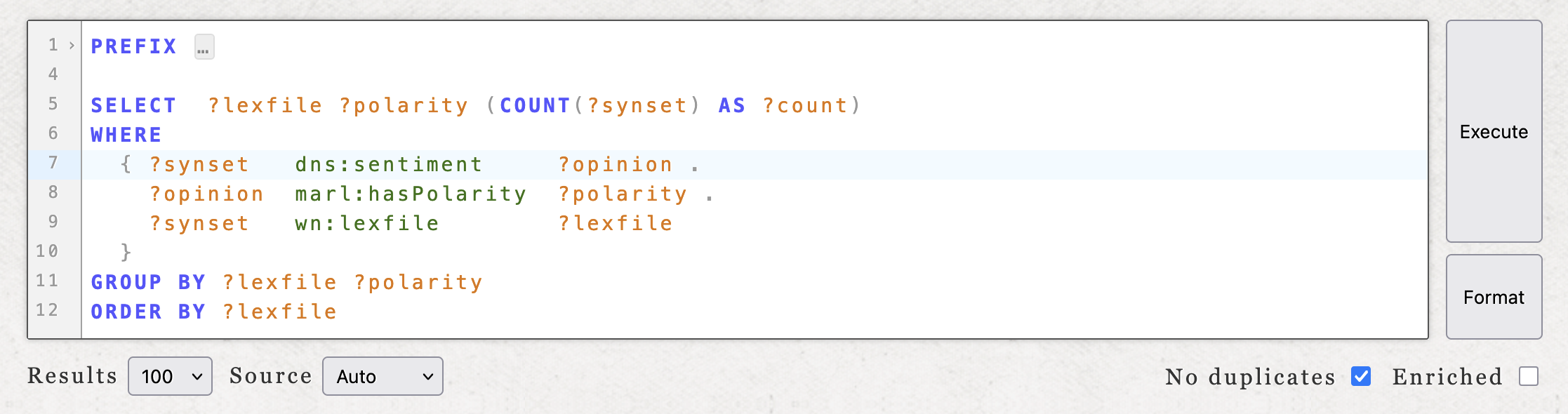
The editor provides a text area with SPARQL syntax highlighting, line numbers, and bracket matching. All common prefixes are pre-declared, so you can use short forms like dn:, dns:, wn:, etc. without writing PREFIX declarations. The prefix block is folded by default to keep the editor clean.
Two buttons sit beside the editor: Execute runs the query, while Format validates and reformats it (without running it). If the query has a syntax error, the error message is displayed inline; if valid, the query is reformatted into a standard layout. This is a convenient way to check your syntax before executing.
Controls
Below the editor there are several controls:
- Results sets the page size (10, 20, 50, or 100 results per page). Note that there is a hard limit of 100 results per request (also regardless of any explicit
LIMITclause in the query). - Source selects the inference mode: Auto (default) lets the server decide, Raw queries only the raw triplestore (faster, but can require writing complex queries), and Inferred forces the inference model (slower, but includes triples derived via logical inference). See Raw, inferred, and auto for details.
- No duplicates toggles
DISTINCTon the results. - Enriched toggles label enrichment. When enabled, the editor looks up human-readable labels for all resource URIs in the results and merges them with the RDF resources, saving you from manually joining on
rdfs:labelin every query. This is also how resources are usually displayed throughout the DanNet website.
Results, pagination, and download
Results are displayed as a table with clickable resource links. If the result set exceeds the page size, previous/next buttons appear. If the query contains a LIMIT or OFFSET, the editor disables the automatic pagination feature and lets you do this manually instead (see LIMIT, OFFSET, and pagination for guidance on when to write these yourself).
Below the results, status indicators show whether the result was served from cache and whether inferencing was used. A JSON download link lets you save the current result set in a standardised format.
The full query state (query text, page size, inference mode, distinct, enrichment) is encoded in the page URL, so you can share or bookmark any query. The "Run this query" links throughout this guide work exactly this way.
Raw, inferred, and auto
The public DanNet triplestore contains both explicitly stated triples ("raw") and triples that can be derived via logical inference. For example, DanNet stores ontolex:sense links from words to senses and ontolex:evokes links from words to synsets as explicit triples. But the inverse link ontolex:isLexicalizedSenseOf (from a sense back to its synset) only exists in the inferred model, because it is derived from the ontology definitions.
The Source control in the editor selects which model to query:
- Raw queries only the explicitly stated triples. It is faster, but some triple patterns that work with inference will return no results.
- Inferred queries the inference model, which includes both raw triples and logically derived ones. It is slower, but more complete.
- Auto (the default) tries the raw model first and automatically retries with the inference model if the raw query returns no results.
Auto works well for most queries, but it can be misleading when a query returns some results from the raw model that are not the results you expected. For instance, a query that scans entries across both DanNet and the English WordNet may find matches in the English data (which has explicit ontolex:isLexicalizedSenseOf triples) while missing the Danish data entirely (where those triples are inferred). Since the raw model returned a non-empty result, Auto never retries with inference.
When you know your query relies on inferred triples, set the source to Inferred explicitly.
Appendix B: Quick overview
RDF is the data format. All data in DanNet is stored as triples, i.e. simple statements of the form subject predicate object. For example: synset-52 has-definition "sødt bagværk…". A collection of triples forms a graph.
SPARQL is the query language for RDF graphs. You write a pattern of triples with unknown variables (marked with ?) and the database finds all matching triples. It's analogous to how SQL queries tables, except here you're querying a graph.
DanNet organises its data around three key building blocks (words, senses, and synsets), following the structure of the original Princeton WordNet. These are formalised for RDF using the OntoLex-Lemon standard. The chain is: Word → Sense → Synset. A word can have multiple senses, and each sense points to a synset. Synsets are connected to each other through semantic relations.
Every RDF resource (words, senses, synsets) is identified by a URI (e.g. https://wordnet.dk/dannet/data/synset-52), and you can visit any of them in your browser. Properties like labels, definitions, and relations are all just triples pointing from one URI to another (or to a text value).
With that in mind, the rest of this guide walks through RDF and SPARQL in detail, starting from scratch.